
Free AI Crawler robots.txt Generator

This free generator builds a robots.txt file that controls which AI and search crawlers can access your site. Choose crawlers by purpose (AI training, AI search, user-triggered fetches and classic search), add your sitemap and private paths, then copy or download the file. It runs in your browser and nothing is stored.

  • Free, no sign-up
  • 17 crawlers from vendor docs
  • RFC 9309 checked
  • Runs in your browser
1. Start from a preset
2. Choose each crawler
CrawlerWhat it doesRule
AI training
Collect pages that may be used to train AI models. Blocking these does not remove you from AI search answers.
GPTBot
OpenAI
Model training. Separate from ChatGPT search. Docs
ClaudeBot
Anthropic
Model training. Docs
Google-Extended
Google
Control token for Gemini training and grounding. Does not affect Google Search or AI Overviews. Docs
Applebot-Extended
Apple
Control token for Apple AI training. Does not block Applebot or Apple search. Docs
meta-externalagent
Meta
AI model training and product indexing. Docs
CCBot
Common Crawl
Open web dataset that many AI models are trained on. Docs
AI search and live retrieval
Index or fetch pages so AI search answers can cite and link to you. Blocking these can remove you from those answers.
OAI-SearchBot
OpenAI
ChatGPT search. Sites that block it are not shown in ChatGPT search answers. Docs
Claude-SearchBot
Anthropic
Claude search results. Docs
PerplexityBot
Perplexity
Perplexity search index. Not used for model training. Docs
Meta-WebIndexer
Meta
Meta AI search results and citations. Docs
User-triggered fetches
Visit a page when a person asks an AI assistant about it. The vendors say robots.txt may not apply to these.
ChatGPT-User
OpenAI
A person asked ChatGPT to open your page. OpenAI says robots.txt may not apply. Docs
Claude-User
Anthropic
A person asked Claude about your page. Docs
Perplexity-User
Perplexity
A person asked Perplexity. Perplexity says it generally ignores robots.txt. Docs
meta-externalfetcher
Meta
User-requested fetches. Meta says it may bypass robots.txt. Docs
Classic search
Regular search engine crawlers. Blocking these removes you from that search engine.
Googlebot
Google
Google Search, including AI Overviews and AI Mode. Docs
Bingbot
Microsoft
Bing search. Docs
Applebot
Apple
Siri, Spotlight and Safari search. Docs

Crawler list last reviewed November 23, 2026 against each vendor's documentation.

3. Your site settings

Start each path with a slash. You can use * as a wildcard and $ to mark the end of an address.

Valid

Check your current robots.txt

How do you use the robots.txt generator?

  1. Pick a preset. Allow everything, keep AI search but opt out of AI training, or block AI crawlers.
  2. Adjust single crawlers. Switch any crawler to Allow or Block. The preview and the validity check update as you go.
  3. Add your sitemap and private paths. Paths are applied to every crawler, including the ones named in their own groups.
  4. Copy or download. Put the file at the root of your site, then check it with the live check.

What does the generated file look like?

This is the output for the preset Allow AI search, block AI training, with the WordPress admin folder kept private and a sitemap added. Training crawlers are blocked in one group; search, user-triggered and classic crawlers are allowed, and each allowed group repeats the private path.
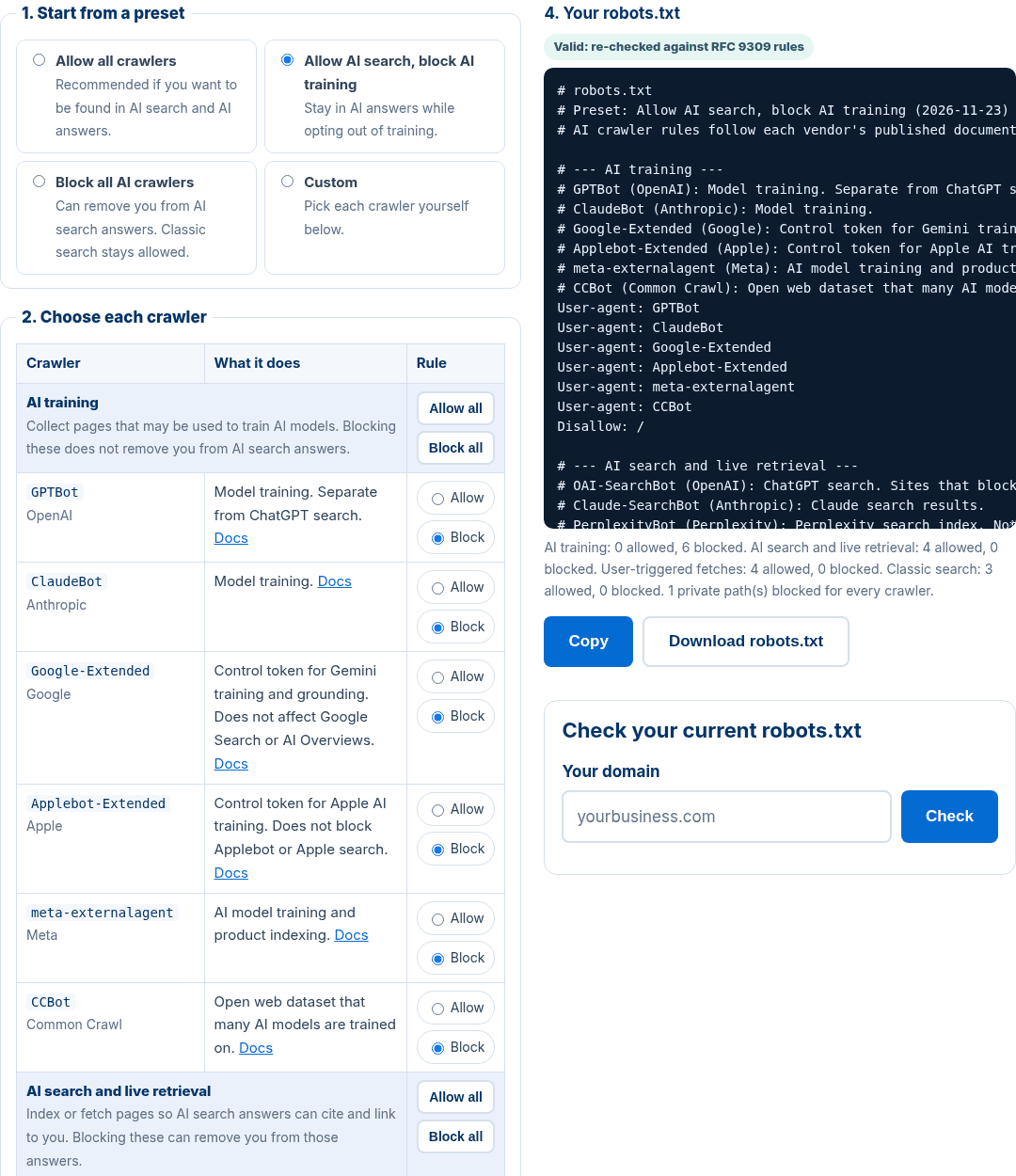

AI Crawler robots.txt Generator with the Allow AI search, block AI training preset selected, AI training crawlers set to block, AI search crawlers set to allow, and the generated robots.txt preview marked valid
The generator with the same preset selected.

What is the difference between AI training, AI search and user-triggered crawlers?

AI training crawlers such as GPTBot, ClaudeBot, meta-externalagent and CCBot collect pages that may be used to train AI models. Google-Extended and Applebot-Extended are control tokens rather than separate crawlers: they tell Google and Apple whether content their main crawlers fetch may be used for AI training. Blocking any of these does not remove you from AI search answers.

AI search crawlers such as OAI-SearchBot, Claude-SearchBot, PerplexityBot and Meta-WebIndexer index pages so AI search can cite and link to them. Blocking these is how sites accidentally disappear from AI answers.

User-triggered fetchers such as ChatGPT-User, Claude-User and Perplexity-User visit a page when a person asks about it. The vendors say robots.txt may not apply to some of them.

Classic search crawlers such as Googlebot, Bingbot and Applebot power regular search results. Google's AI Overviews follow Googlebot, not Google-Extended.

Methodology: how does the generator work?

  • One group per purpose. Blocked crawlers in a purpose share one group ending in a rule that blocks the whole site. Allowed crawlers share a group that allows the whole site, or with your private paths.
  • Private paths are repeated. Under RFC 9309 a crawler that matches a named group ignores the general group for all crawlers (the one marked with an asterisk), so your blocked paths are copied into every allowed named group as well as the catch-all group.
  • Checked before you copy. The output is parsed again with an RFC 9309 matcher (most specific group, longest matching rule, Allow wins a tie, * and $ supported). The Valid badge only shows when every crawler gets exactly the rule you chose and every private path is blocked.
  • Nothing invented. Every user agent comes from its vendor's own documentation, linked in the table. We leave out Crawl-delay (Google ignores it) and non-standard lines.
  • Live check. The optional check fetches only the robots.txt of the domain you enter, from our server, with the same safety limits as our AI Search Readiness Checker. It is kept for one hour and nothing else is stored.
  • Honest limits. robots.txt records your preference. A crawler can ignore it, and a host or CDN firewall can block a crawler that robots.txt allows.

Crawler list last reviewed November 23, 2026 by Michael Sanchez, Founder. We re-check it against the vendor docs every month.

Embed this tool

You are welcome to add the generator to your own resource page. Copy the code below and keep the credit link.


"In many cases AI-recommended visits convert about 20 to 25 times higher than typical Google top-10 search."Michael Sanchez, Founder of Rise Peak Digital. This is his observation from client work, offered as opinion, not a promise of results.

Frequently asked questions

Will blocking GPTBot remove my site from ChatGPT?

No. GPTBot is the crawler OpenAI uses for model training. ChatGPT search uses OAI-SearchBot, and OpenAI says the two settings are independent. If you block OAI-SearchBot, your pages are not shown in ChatGPT search answers.

Does Google-Extended affect AI Overviews?

No. Google says Google-Extended controls whether content it crawls is used for Gemini model training and grounding, and that it does not affect inclusion in Google Search. AI Overviews are part of Google Search, so they follow Googlebot and the normal search controls.

Do AI crawlers obey robots.txt?

The major vendors say their crawlers follow robots.txt. User-triggered fetchers are different: OpenAI says robots.txt may not apply to ChatGPT-User, and Perplexity says Perplexity-User generally ignores it. robots.txt is a request, not a security control, so use a firewall rule if you need to enforce a block.

Where do I put the robots.txt file?

At the root of your domain, so it loads at https://yourdomain.com/robots.txt. Each subdomain needs its own file. Many website platforms and SEO plugins let you edit robots.txt from the dashboard instead of uploading a file.

Why are my private paths repeated for each crawler?

Under the robots.txt standard (RFC 9309), a crawler that finds a group with its own name ignores the general group for all crawlers (the one marked with an asterisk). So when a crawler is named, its group has to repeat your blocked paths, or that crawler could reach paths you meant to keep private. The generator does this for you.

How long do robots.txt changes take to work?

Crawlers cache robots.txt. OpenAI says changes can take about 24 hours to show in ChatGPT search, and Meta and Perplexity also mention up to 24 hours.

Want help putting your results to work?

Not sure which crawlers to allow for your business? We can review your robots.txt and AI visibility with you.

Book a strategy call
Scroll to Top